
Quick answer
A PDF may contain text objects, only an image of text, or both. OCR can recover words from an image, but its output needs checking. In our five-fixture test, an image-only page had no native extracted text; a two-column page returned all marked labels in the wrong sequence. Copying problems can involve both the text layer and its reading order.
Contents
- The page you see and the text a tool reads
- Five fixtures with known expected text
- The text layer mattered, and order still mattered
- OCR helped, but a larger render did not fix these labels
- A practical way to diagnose the problem
- Method and evidence
Two PDF pages can look alike while exposing very different text. In our test, native extraction recovered the five marked text labels from a searchable page and its image-plus-hidden-text counterpart. It recovered none from the image-only version. OCR read some of those labels from the image, but it introduced errors.
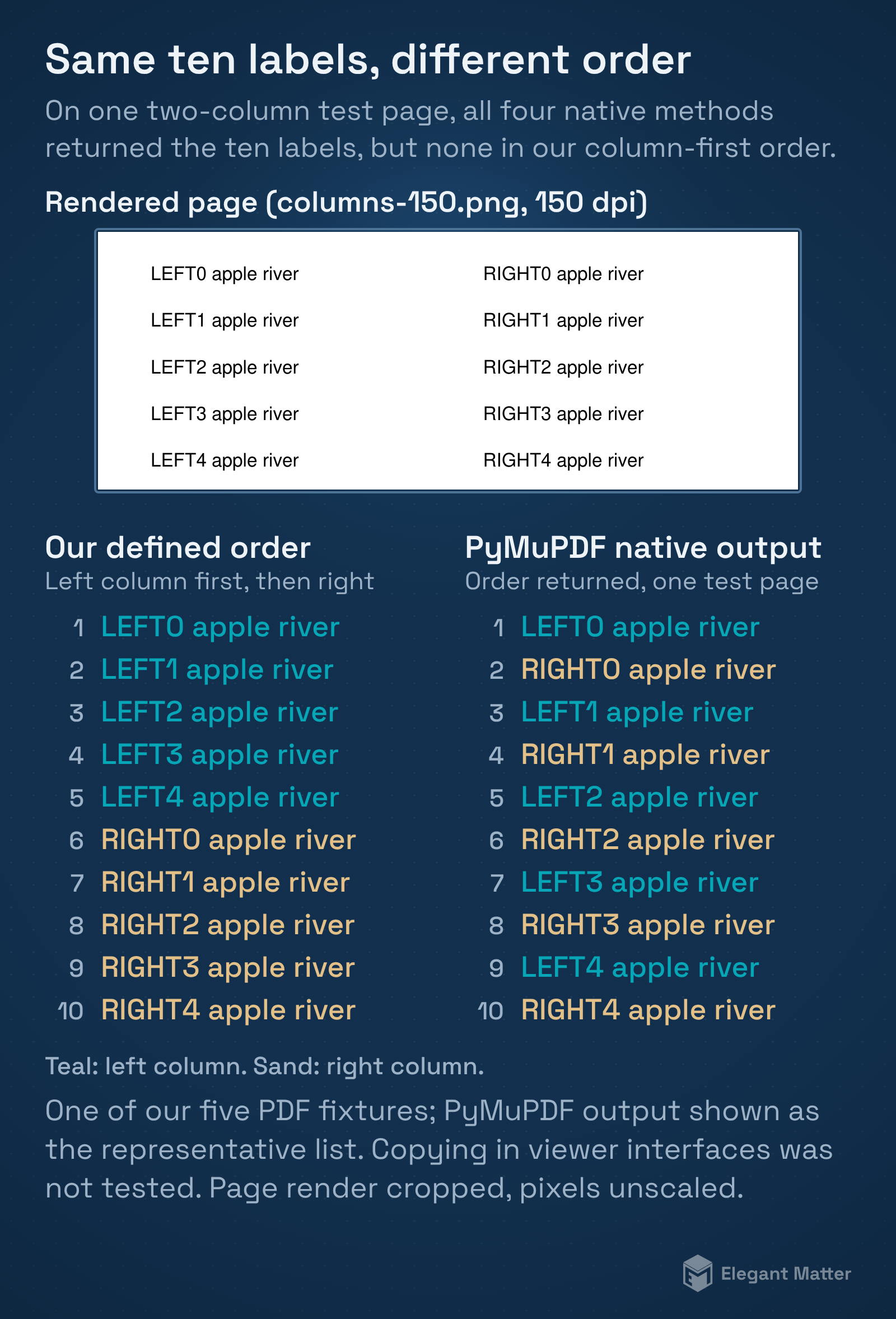
We also found that recovering every label did not guarantee the intended reading order. Our two-column fixture returned all ten marked labels through every native extraction method, yet none matched the column-first sequence we had defined before testing.
The page you see and the text a tool reads
A PDF can draw words with text objects, display a raster image of a page, or combine the image with an invisible text layer. Native extraction reads text objects. OCR analyzes a rendered image and estimates the characters visible there.
The PyMuPDF text recipes explain extraction, sorting and OCR as different operations. Our experiment compared explicit local methods; it did not test clipboard behavior in Acrobat, Preview or every browser PDF viewer.
If your document contains only a scan, changing the way you select the page cannot create an absent text layer. If text exists but arrives in an unexpected order, recognition may not be the main problem. The two cases call for different checks.
Wrong characters are a different problem from words arriving in the wrong order. PyMuPDF’s FAQ describes font encodings that lack a usable mapping back to Unicode, so text can look correct on the page but extract as nonsense. OCR can be a fallback, with its output checked against the page. Our fixtures did not test broken font mappings.
Five fixtures with known expected text
We created a single-column page, a two-column page, a simple table, an image-only page and a page combining an image with hidden text. All used original ASCII English text. We recorded the expected labels and reading order before inspecting the outputs.
The two-column page was intentionally authored with left and right lines interleaved in the content stream. The expected reading was the left column from top to bottom, followed by the right. That construction made reading-order behavior visible without claiming to represent every two-column PDF.
For each fixture we compared PyMuPDF native and sorted extraction, Poppler’s default and layout modes, and Tesseract OCR on renders at 150 and 300 dpi with English language data and page-segmentation mode 6. Five fixtures times six settings gave 30 observations, and we repeated them.
The text layer mattered, and order still mattered
This table summarizes the four native methods and the two OCR renders. Label recovery counts only the exact diagnostic labels, not every word on the page.
| Fixture | Native labels | Native order exact | OCR 150 labels | OCR 300 labels |
|---|---|---|---|---|
| single | 5/5 | Yes | 3/5 | 3/5 |
| columns | 10/10 | No | 7/10 | 7/10 |
| table | 15/15 | Yes | 12/15 | 12/15 |
| image | 0/5 | No | 3/5 | 3/5 |
| hybrid | 5/5 | Yes | 3/5 | 3/5 |
All four native methods agreed on these label counts. They found every expected label in the searchable fixtures, and none in the image-only fixture. The two-column result still differed from the authored column-first reading order, including when we requested sorted or layout extraction.
The table fixture’s labels appeared in the expected token sequence in native extraction. That narrow success does not prove that the output preserved a structured table with reliable rows, columns or cell relationships. Plain text and a usable spreadsheet are different outputs.
OCR helped, but a larger render did not fix these labels
Tesseract recovered three of the five exact labels from our image-only page at both 150 and 300 dpi. The image contained readable words, but some numbered labels were misrecognized. Similar label errors appeared when OCR was applied to the searchable single-column fixture.
Those counts are diagnostic-label results, not a general OCR accuracy percentage. We retained the complete expected and extracted text, then separately computed word edit distance after normalizing whitespace. That comparison records insertions, deletions and substitutions; it does not fully evaluate reading order or document structure.
Increasing resolution can be worth testing in a real workflow. Our results show only that changing these renders from 150 to 300 dpi did not fix their particular exact-label errors under the chosen OCR settings. We did not test handwriting, arbitrary languages, damaged scans or competing cloud OCR systems.
A practical way to diagnose the problem
- Check whether the page has selectable text and whether native extraction returns meaningful words. Keep a copy of the original.
- If the page is image-only, try OCR with the appropriate language and inspect the result against the image.
- If words are present but scrambled, examine columns and layout rather than assuming OCR will solve the sequence.
- Verify numbers, identifiers, dates and table relationships before using extracted text as data.
- If copying is explicitly restricted, request an accessible or authorized version from the document owner.
We did not create permission-restricted fixtures or test security restrictions, so that last case is outside the experiment. A scanned page and a permission setting are not interchangeable explanations.
These same distinctions matter when passing a PDF’s extracted text to another system. Seeing the correct page image does not guarantee that the system receives the same content or sequence. Our test establishes extraction behavior for the saved fixtures, without measuring downstream AI answers.
Method and evidence
The study was run on 13 Oct 2026 with Python 3.12.14, PyMuPDF 1.26.6, Poppler pdftotext 24.02.0 and Tesseract 5.3.4. We retained five original PDFs, complete extracts, authored ground truth, the 30 case records and the separately documented word-comparison follow-up. Repeat records matched, and the fixture layouts were inspected.
The evidence package contains the original pages and each method’s output, so you can compare the visible text with the extracted words and their order.
Download the study files and results (ZIP).
Original fixtures, scripts and study results are available under CC0 1.0; third-party software retains its own licenses.