
DNS over HTTPS is a useful privacy and security layer. It is not a cloak for everything your device does online.
Quick answer
For most people, leaving DNS over HTTPS enabled is sensible. It encrypts DNS requests between your browser or operating system and the DNS resolver, stopping ordinary devices on the local network path from reading or changing those plaintext lookups. It does not make browsing anonymous: the resolver can still see the domain query, and normal connections can still expose destination IPs and other metadata. Keep fallback behavior unless you understand the VPN, parental-control or managed-network policy you are overriding.
DoH can also conflict with parental controls, enterprise policies, VPN DNS, local hostnames or filtering resolvers. That is why browser defaults often include fallback and network-detection behavior rather than forcing encrypted DNS in every situation.
Contents
- What DNS over HTTPS changes
- The resolver still sees the lookup
- What DoH does not hide
- Who can see what before and after DoH
- Why Firefox sometimes falls back or turns DoH off
- When DoH can cause problems
- DoH is not a VPN
- DoH vs DoT, ODoH and ECH
- So should you turn it on?
What DNS over HTTPS changes
Before your browser can connect to elegantmatter.com, it normally needs to discover the IP address associated with that name. DNS is the system that performs that lookup.
Traditional DNS commonly sends those queries without transport encryption. A device on the same network path can therefore observe the request or, in some situations, interfere with it.
DNS over HTTPS, or DoH, wraps DNS messages inside HTTPS. Microsoft describes the result as confidentiality and integrity for DNS traffic between a DoH-capable client and the DNS server, protecting those queries from passive monitoring and modification while they are in transit.
That is a concrete improvement. Someone watching ordinary plaintext DNS on the local Wi-Fi or network path no longer gets the same easy list of names from the DNS packets themselves.
But the protected path has an endpoint: the resolver.
The resolver still sees the lookup
Standard DoH changes who can read the DNS query. It does not eliminate the query.
Your browser or operating system sends the encrypted request to a DNS resolver. That resolver must decrypt the request so it can answer it. With ordinary DoH, the resolver can therefore see the domain being requested and, normally, the client IP address making the request.
Cloudflare’s documentation for Oblivious DNS over HTTPS states this distinction directly: standard DoH encrypts the query in transit, but the resolver still sees both the IP address and the domain being looked up. ODoH adds an intermediary so that no single participant sees both pieces together.
This is why choosing a resolver is a trust decision.
DoH can move visibility away from the local network or ISP-operated resolver and toward a resolver you selected. Whether that is better depends partly on the resolver’s policies, jurisdiction, retention practices and your threat model.
What DoH does not hide
A DNS lookup is only one part of a web connection.
After the browser learns an IP address, it still has to connect to the destination. The network can normally see the IP address it connects to. Depending on the protocol and server setup, other metadata can reveal additional information too.
DoH therefore does not:
- Hide your public IP address from the sites you visit.
- Route traffic through another network the way a VPN does.
- Prevent the chosen DNS resolver from seeing ordinary DoH queries.
- Stop a site from recognizing you through logins, cookies or browser fingerprinting.
- Encrypt every DNS hop that might exist after your chosen resolver receives the query.
That last point is easy to miss. Microsoft’s current Windows Server documentation notes that enabling DoH between a client and DNS server does not automatically encrypt every upstream DNS interaction, such as forwarding or zone-transfer traffic.
The privacy win is real, but it has a specific boundary.
Sites can also recognize browser characteristics through browser fingerprinting, which is separate from whether DNS lookups are encrypted.
Who can see what before and after DoH
A useful mental model is to separate observers.
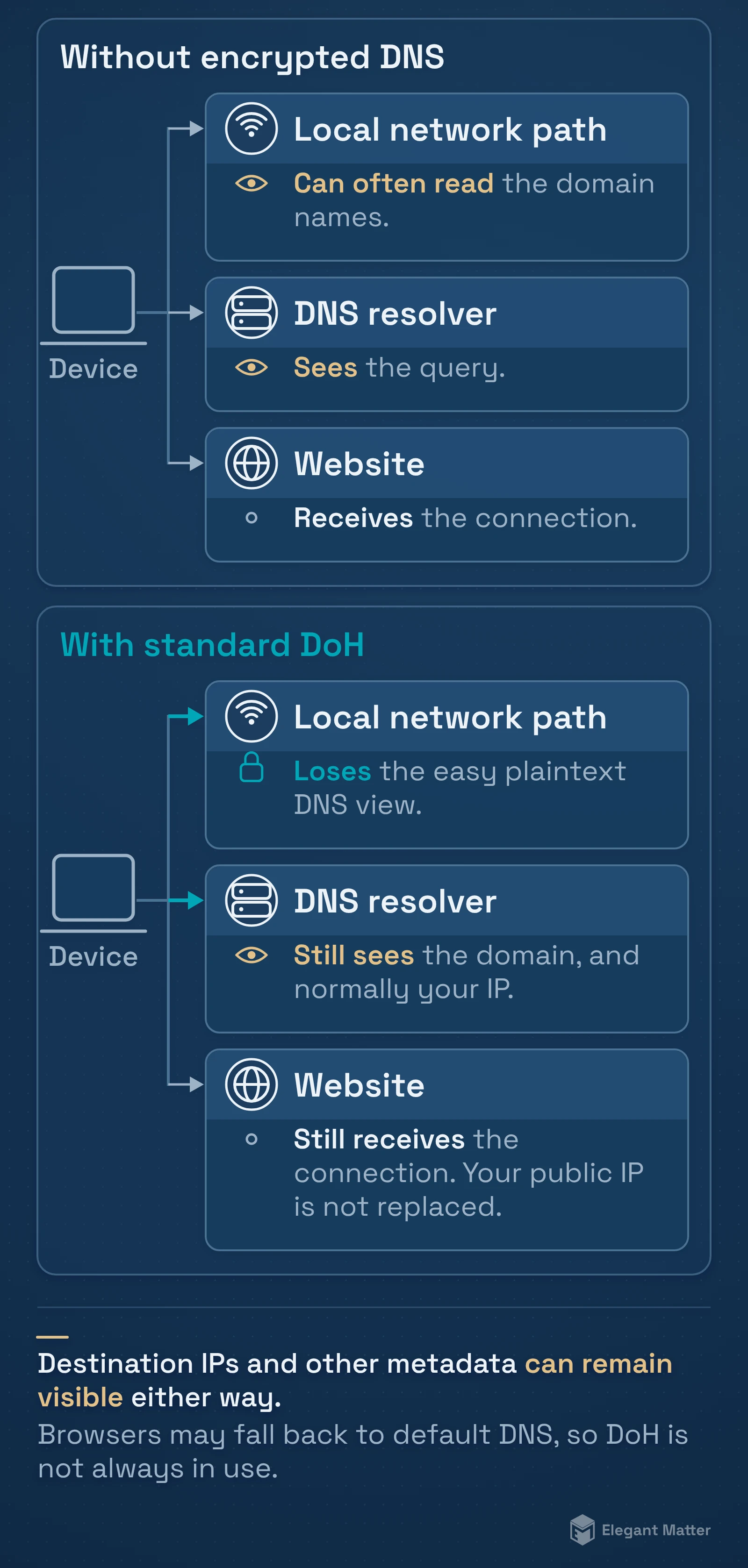
Without encrypted DNS, the local network path can often see the domain names in DNS traffic, the configured resolver sees the query, and the destination site sees the connection it receives.
With standard DoH, the local network path loses the easy plaintext DNS view. The DoH resolver still receives the domain query. The destination still receives the connection. Your public IP is not replaced.
A VPN changes a different part of this picture: it can move the network-visible destination traffic behind a tunnel to the VPN provider. That does not make DoH pointless, but it means the VPN’s DNS configuration matters. Forcing a browser to use a separate external DoH resolver can sometimes bypass the DNS handling the VPN intended.
Why Firefox sometimes falls back or turns DoH off
Firefox’s current default protection is a good example of why “maximum encrypted DNS at all times” is not automatically the best user experience.
Mozilla says Firefox can fall back to the default resolver if secure DNS has problems. Under its default protection, DoH may also be disabled when a VPN, parental controls or enterprise policies are active, or when the network signals that secure DNS should not be used.
Those exceptions exist because DNS can carry local meaning.
A home network might use DNS-based parental filtering. A work network may resolve internal names that public resolvers do not know. A VPN may need its own resolver for internal resources or leak prevention. A security product may rely on a filtered DNS service.
If the browser silently sends every query to a public resolver instead, those systems can stop working as intended.
To inspect desktop Firefox, open the menu and go to Settings → Privacy & Security → DNS over HTTPS. Mozilla’s instructions, checked on 30 October 2026, place the protection choices under Advanced settings. Read the status as well as the selected mode: Active means Firefox is using secure DNS; Not active can reflect a connection problem or a network policy; Off means the feature is disabled.
Max Protection shows a warning when the secure resolver cannot be reached or reports no address for a domain. The warning can offer a domain exception that uses system DNS. Choose that stricter behavior deliberately, with your VPN and managed-network requirements in mind.
When DoH can cause problems
Encrypted DNS is most likely to surprise you when the network expects DNS to do more than public name resolution.
Common examples include:
- A corporate or school network with internal hostnames.
- Split DNS, where the same name resolves differently inside a private network.
- Parental controls or malware filtering provided by the network resolver.
- A VPN that supplies its own DNS configuration.
- A captive portal or unusual access network that expects the system resolver.
- A home lab with local names that only your router or private DNS server knows.
If changing DoH suddenly makes an internal site, printer, NAS or filtered service stop resolving, the right conclusion is not that encrypted DNS is “broken.” It may simply be bypassing the resolver that knows about that name or policy.
DoH is not a VPN
The easiest way to remember the difference is to ask what is being tunneled.
DoH tunnels DNS messages inside HTTPS to a DNS resolver.
A VPN tunnels much more of your device’s network traffic to a VPN endpoint.
Those are different jobs. A VPN provider can also operate the DNS resolver used inside the tunnel, which means the two technologies may work together.
If you already use a VPN, the safest default is usually to let the VPN and operating system/browser cooperate unless you have a specific reason to override DNS separately. Check the VPN’s documentation before forcing an external resolver.
DoH vs DoT, ODoH and ECH
Several similar abbreviations solve neighboring problems.
DNS over TLS, or DoT, encrypts DNS transport using TLS on a dedicated connection rather than carrying it inside normal HTTPS. For a typical user, the most important point is that both DoH and DoT can protect the DNS query in transit; implementation and network behavior differ.
Oblivious DoH, or ODoH, is designed to separate the client identity from the DNS query by putting a proxy between the client and target resolver. Cloudflare’s current documentation describes the proxy as seeing the client IP but not the encrypted query, while the target sees the query but only the proxy’s IP. It also notes that the relevant RFC is experimental.
Encrypted Client Hello, or ECH, addresses information in the TLS connection setup rather than DNS itself. It is another reminder that encrypting DNS does not automatically encrypt every piece of connection metadata.
You do not need to enable every acronym to get value from DoH.
So should you turn it on?
For a normal personal device on home, café, hotel or other ordinary networks, DoH is a sensible default privacy improvement.
Keep the automatic fallback behavior unless you have a reason to make it stricter. Choose a resolver you are comfortable trusting. If you use a VPN, managed device, parental-control service or private network, check how that system expects DNS to work before overriding it.
Most of all, use the right expectation: DoH stops easy plaintext observation and manipulation of the DNS request on the path between you and the resolver. It does not hide every site you contact, replace a VPN or make the browser anonymous.