
Passkeys are a stronger sign-in system than passwords in one important way: there is no reusable password to type, reuse or hand to a phishing site. A website verifies a cryptographic response instead of checking a shared secret that you know and enter.
Passkeys do not all use the same storage model. Some passkeys sync through a credential manager and can follow you to a replacement device. Others are bound to one device or security key. The difference matters most when a phone, laptop or key is lost.
Quick answer
Passkeys are generally safer than passwords for sign-in because there is no reusable password to steal, reuse or type into a phishing site. Losing a device does not automatically mean losing access: synced passkeys can become available through the credential provider on a replacement device, while a device-bound passkey stays with the device and may be lost with it. Your real fallback is the passkey provider and the account-recovery methods the website still supports.
Contents
- Passkeys vs passwords: what actually changes?
- Why passkeys are harder to phish
- Synced and device-bound passkeys are not the same thing
- What happens if you lose your phone or computer?
- What happens when you get a new device?
- Do passkeys completely replace passwords yet?
- Should you switch from passwords to passkeys?
Passkeys vs passwords: what actually changes?
A password is a secret shared between you and a service. You remember it, store it in a password manager or both. When you sign in, that secret—or a cryptographic representation derived from it—is part of the authentication process. If an attacker gets the password, they can often try to use it too.
A passkey changes the model. Passkeys are FIDO credentials built on standards including WebAuthn and CTAP. Instead of one reusable secret, the credential uses a public/private key pair. The service can keep the public key. The private credential stays with your device, security key or passkey provider and is used to sign a challenge when you approve a login.
You normally approve that login with the same local method you use to unlock the device, such as a fingerprint, face scan or PIN. That biometric or PIN is not sent to the website as a replacement password. It unlocks use of the passkey on your device.
The practical differences are easier to see side by side.
| Attribute | Password | Synced passkey | Device-bound passkey |
|---|---|---|---|
| What you use at sign-in | Password text, typed or autofilled | Device unlock approves use of the synced credential | Device or hardware unlock approves use of the local credential |
| What the service keeps | Password verifier / password-derived account credential | Public key for the account | Public key for the account |
| Phishing resistance | Lower; a user can still type a password into a convincing fake site | High; the credential is tied to the legitimate service | High; the credential is tied to the legitimate service |
| Credential reuse risk | Possible if the user reuses the same password elsewhere | No reusable website password | No reusable website password |
| Use on another device | Usable anywhere you can enter or retrieve the password | Usually available through the same passkey provider; cross-device sign-in may also work | Requires the original device/key, cross-device use from it, or another registered credential |
| If one device is lost | The password usually still exists if remembered or stored elsewhere | Losing one device usually does not erase a synced copy; provider recovery matters | A sole device-bound credential can be lost with the device |
| Recovery dependency | Website recovery plus password manager/2FA as applicable | Passkey provider plus website recovery or fallback | Backup passkey/key plus website recovery or fallback |
The distinction between the two passkey columns is what many comparisons miss. “Passkey” describes the authentication credential, but it does not by itself tell you whether that credential is copied across your devices or stays on one piece of hardware.
Why passkeys are harder to phish
Traditional phishing relies on getting you to enter a valid secret into the wrong place. A convincing fake login page can collect a password because a password is portable: the same text can be typed into the real site or the fake one.
Passkeys are designed around the site or app they were created for. Microsoft’s current passkey guidance gives a simple example: a passkey created for one registered domain cannot be presented to a lookalike domain. The device and browser take part in deciding whether the credential can be used, rather than leaving that judgment entirely to the person looking at the page.
Passkeys also remove password reuse from normal sign-in. There is no single remembered string that you can accidentally reuse across ten sites, and a breach of one website does not reveal a reusable password that can be stuffed into other services. The FIDO Alliance describes passkey authentication as asymmetric challenge-response: the service does not need to hold the private secret used to create the response.
The rest of the account can still be attacked in other ways. A service can still have weak account recovery, an attacker can still compromise an already signed-in device, and a passkey provider account can become an important dependency. The improvement is specifically strong at the sign-in step that passwords have historically made easy to phish and reuse.
Synced and device-bound passkeys are not the same thing
The FIDO Alliance separates passkeys into two broad types.
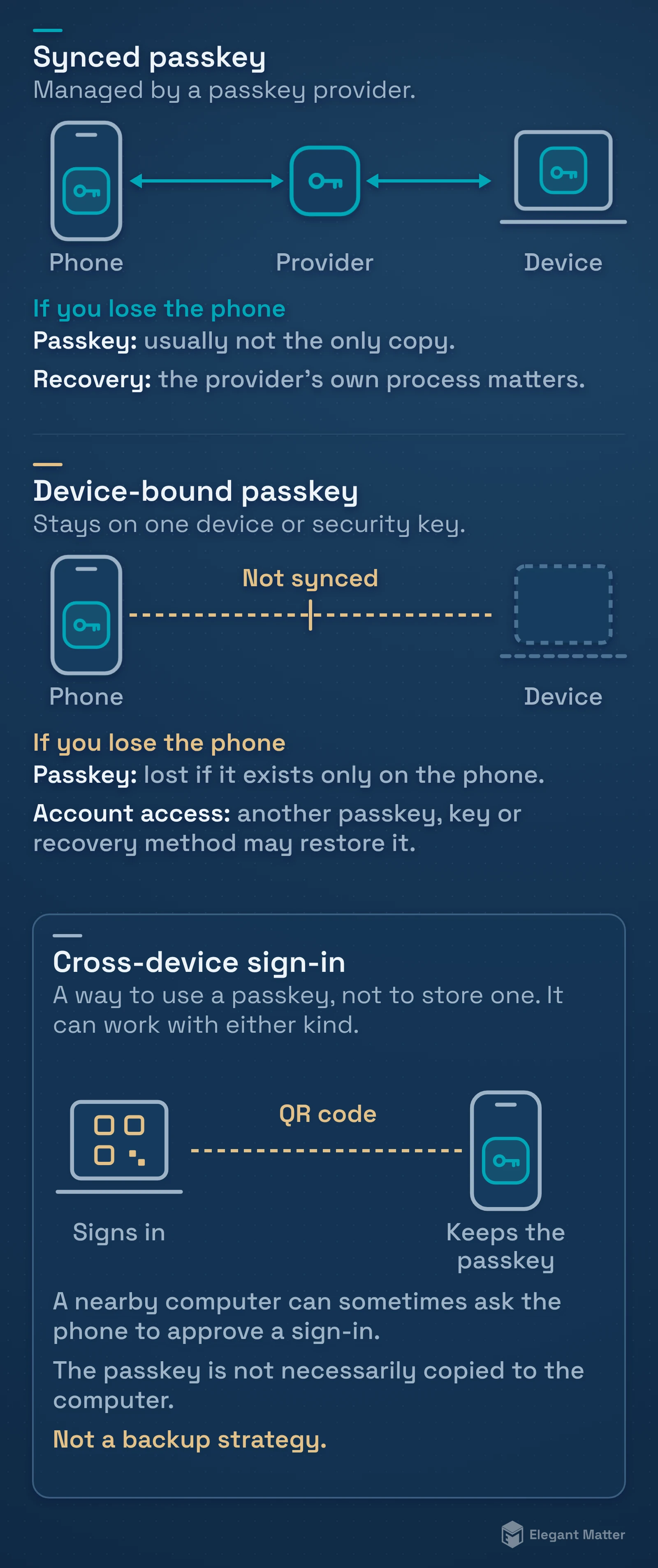
A synced passkey is managed by a passkey provider or credential manager. Examples include iCloud Keychain, Google Password Manager, Microsoft Password Manager and third-party password managers that support passkeys. When the provider supports synchronization, the passkey can become available on other devices signed into that same provider account.
A device-bound passkey stays on one device or hardware security key. It does not automatically appear on your other devices through cloud synchronization. Hardware security keys are a common example, and local platform credentials can also be device-bound.
There is a third behavior worth separating from both: cross-device authentication. A passkey can sometimes stay on your phone while you use it to sign in on a nearby computer. FIDO’s cross-device flow can use a QR code and a proximity check. That does not necessarily mean the passkey has been copied to the computer.
Syncing, device binding and cross-device use are easy to blur together because each can result in “I signed in on another device.” Their recovery implications are different.
What happens if you lose your phone or computer?
The answer depends on where the passkey was stored.
If the passkey is synced, losing one device usually does not destroy the only copy. The credential provider is designed to give you continuity across devices, subject to its own account-security and recovery process. That process is now part of your authentication setup, so it is worth knowing how it works before you need it.
Apple is unusually explicit about this. Passkeys stored in iCloud Keychain sync across a user’s Apple devices, and Apple documents a recovery process intended to restore the keychain even if all associated devices are lost. Recovery can involve the Apple Account, a trusted phone number, a device passcode and, if configured, an account recovery contact. That is Apple’s recovery design, not a promise that every passkey provider works the same way.
Google handles the immediate lost-device problem from the account side. Its current help documentation tells users who lose a device with a passkey to sign in from another accessible device and remove the passkey associated with the lost or stolen device. Google also exposes “Try another way” when other sign-in choices are available.
A device-bound passkey is different. Microsoft’s current support documentation states that if the passkey exists only on the device and the device is lost, the passkey is lost unless you have another recovery method. That can mean another registered passkey, a hardware key, a password or another recovery path provided by the service.
Losing a credential does not necessarily mean losing the account. A device-bound credential can disappear with the hardware without necessarily making the account unrecoverable. Whether you can get back in depends on what else the service accepts.
What happens when you get a new device?
With a synced credential manager, the transition can be relatively uneventful. Microsoft says passkeys stored in a synced manager can be available after you sign into that manager on the new device. FIDO describes the same general model: a synced passkey becomes available to the user’s other devices through the same passkey provider.
A local or device-bound passkey does not follow automatically. Microsoft recommends creating a new passkey on the replacement device before removing an old one when the credential was stored locally. For a hardware security key, the credential remains on the key rather than on the new phone or laptop.
Cross-device authentication can bridge some gaps. If your passkey is on your phone, a nearby computer can sometimes ask the phone to approve the sign-in without storing the passkey locally. That is useful when you are on a temporary or new computer, but it should not be confused with a backup strategy.
The safest time to check your recovery setup is while all of your devices still work. If an account gives you several ways back in, confirm which ones are active before deleting a password, old passkey, recovery email or other fallback.
If an account depends on an email alias or relay for recovery messages, check how email aliases and masked addresses work before disabling that address.
Moving to a different password manager is a separate task: our Proton Pass vs Bitwarden comparison explains export and transfer limits, including why passkey transfer needs its own check.
Do passkeys completely replace passwords yet?
Not always.
A service can support passkeys while still allowing passwords, one-time codes or other recovery methods. It can also let some users go fully passwordless while others keep a password on the account. The transition is happening service by service, not through one universal switch.
A passkey can make your normal sign-in phishing-resistant even if a weaker password still exists as a fallback. In that case, the account is only as resistant to takeover as the full recovery and fallback system, not just the method you use every day.
Removing the password can reduce that fallback risk, but only when the service gives you a recovery system you understand and trust. “Passwordless” should not be read as “recovery-less.” An account still needs a way to deal with lost devices, lost credentials and people who cannot access their usual provider.
Should you switch from passwords to passkeys?
For most people, using passkeys where a service offers them is a sensible upgrade. They remove several common password failure modes without asking you to memorize anything new.
For most users, the harder question is where the recovery dependency should live.
A reputable synced provider gives mainstream users convenience and redundancy. Your passkeys can follow you across devices, and losing one phone is less likely to become a crisis. The tradeoff is that your provider account and its recovery process become more important.
Device-bound passkeys and hardware security keys make sense when keeping a credential tied to specific hardware is desirable. They can offer a higher-assurance model, but the user has to plan redundancy deliberately—typically with another credential or recovery path kept somewhere safe.
Before relying on a passkey as your main way into an important account, check three things:
- Where is this passkey stored: synced provider, local device or hardware key?
- What will I use if that device or provider is unavailable?
- Does the website still accept a password or another recovery method that could bypass the stronger passkey sign-in?
Passkeys improve the part of authentication that happens every day. A good setup also accounts for the day your normal device is not there.
Sources and verification
- FIDO Alliance. “FIDO Passkeys: Passwordless Authentication.”
- Microsoft Support. “What are passkeys and why they matter.”
- Microsoft Support. “Manage your saved passkeys.”
- Google Account Help. “Sign in with a passkey instead of a password.”
- Apple Support. “About the security of passkeys.”
- Apple iPhone User Guide. “Make your passwords and passkeys available across devices with iPhone and iCloud Keychain.”